

Apps are everywhere. Users download billions every year. But most apps fail. Why? Bad planning. Weak testing. Not listening to what users actually want.
We’ve built dozens of apps over twenty years. We learned the hard way what works. Success needs three things: smart strategy, fast performance, and great user experience. The competition in 2026 is crazy. Mistakes from five years ago cost way more money now. This guide shares what actually works from real work, not theory.
How To Start Building Apps Right: 10 Mobile App Development Tips
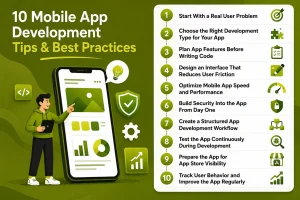
Building a successful app takes planning, testing, and listening. We’ve learned what works and what doesn’t. Here are the ten things every team should focus on when building mobile apps.
1. Start With a Real User Problem
Most developers build apps that nobody wants. We spent six months building a feature-rich app. Nobody wanted it. That hurt.
Before coding, find real problems:
- Talk to 20-30 people. Not surveys. Real conversations.
- Ask them about pain points in their daily work.
- Check what competitors are doing and what they’re missing.
- Write down your app’s value in one sentence.
- Create a map of what users need most.
Conversations reveal what surveys hide. One client wanted feature A. Interviews showed they needed feature B. That saved months of work.
2. Choose the Right Development Type for Your App
Your tech choice makes or breaks cost and timeline. We’ve seen teams pick wrong and regret it for years.
Here’s what we recommend:
- Native development is fastest and most powerful. Use it for games and real-time apps. Costs more upfront.
- Cross-platform like React Native gets apps on iOS and Android faster. 40-60% cheaper. Some speed tradeoffs.
- Hybrid apps are fading. We rarely use them now.
- Pick your tech based on team skills, timeline, and what your app needs.
- Cost versus performance is real. Cheap doesn’t mean good if users see lag.
We used React Native for an MVP once. When we had users and money, we switched to native. That’s the smart move.
3. Plan App Features Before Writing Code
Most developers skip this step. Then they ship apps with 50 features nobody uses.
We’ve seen this trap many times:
- Pick your core features (5-7 max) that solve the main problem.
- Ship an MVP first. Add more based on real user feedback.
- Don’t add every idea at launch. You can add later.
- Map out how users will move through your app.
- Plan for growth now. Big changes later cost more.
We ask each feature: “Will 80% of users need this in month one?” If no, it goes to version 2.0. This cuts development time by 30-40%.

4. Design an Interface That Reduces User Friction
Good design means fewer steps between what users want and doing it. We watched apps fail because the interface annoyed people.
What matters:
- Keep navigation simple. Three taps to anything.
- Make it work for thumbs. 80% of people navigate with their thumbs. The top buttons are wrong.
- Use familiar patterns. Don’t invent new navigation.
- Add accessibility. Dark mode. Big text. Color contrast.
- Onboard fast. Users should see value in 30 seconds.
We redesigned an app once. The signup went from 15 steps to 3. Conversions doubled. Users want speed.
5. Optimize Mobile App Speed and Performance
Slow apps get deleted. We saw a half-second delay cut engagement by 25%.
Make your app fast:
- Load in under 2 seconds. One second is better.
- Batch API calls. Cache data. Don’t load everything at once.
- Shrink images and files. Unoptimized images waste 60% of data.
- Fix slow database queries. They kill the whole app.
- Watch battery use. Heavy apps get removed fast.
Real devices tell the truth. Simulators lie. An app smooth on a simulator crawls on old Android phones. Test on actual devices from 2-3 years back.
6. Add Security Into the App From Day One

Security added later never works. We’ve patched holes over and over. It costs way more to fix later than to build it right.
Your security needs:
- Use real authentication. Multi-factor is standard now. Don’t code your own.
- Encrypt sensitive data. Both when sent and stored.
- Use real payment processors. Not your own code.
- Protect your APIs. Rate limiting. Token auth. Clean inputs.
- Follow privacy laws. It’s about trust.
We hire a security expert early. It adds 5-10% to costs but saves huge money when breaches happen.
7. Create a Structured App Development Workflow
Messy development creates messy apps in the real world. We’ve seen organized teams move faster than “agile chaos” teams.
Our workflow:
- Gather requirements first. Skip this, and surprises hit mid-project.
- Wireframe and prototype. Find design problems before you code.
- Run two-week sprints. Daily standups. Clear targets.
- Use collaboration tools. Jira. Slack. GitHub.
- Document everything. When people leave, documentation saves you.
We learned hard: teams without docs create nightmares. Write as you build.
8. Test the App Continuously During Development
Testing at the end is a killer mistake. We switched to testing during development 15 years ago.
What we test:
- Functional tests. Does it work?
- UI tests. Do users like it?
- Device tests. Works on all phones and Android versions?
- Load tests. What happens with 10,000 users?
- Bug tracking. Fix critical bugs today. Small ones next week.
We automate 70% of testing. Humans handle edge cases and surprises. Bugs in QA cost $100. Bugs users find cost $10,000+ in reputation and support.

9. Prepare the App for App Store Visibility
A great app nobody knows about fails. App Store Optimization matters.
Get visibility:
- Optimize your app listing. Treat it like a product page.
- Research keywords for titles and descriptions. Use App Annie or Data.ai.
- Show your best features in screenshots and previews.
- Build ratings. Get to 4+ stars. Users see this first.
- Keep users around. If they delete in week one, rankings drop.
We’ve seen two apps. Same quality. One ranks in the top 10. One is buried. The difference? One did ASO work.
10. Track User Behavior and Improve the App Regularly
Launch is day one, not the finish line. Apps that stop changing die.
What we watch:
- Use analytics tools. Firebase. Mixpanel. Amplitude. See what users do.
- Track retention. Do they use it daily or delete it?
- Watch crash reports. Even one crash per 1,000 uses is bad.
- Get user feedback. Reviews. Support emails. In-app surveys.
- Ship updates monthly. Use data to decide what changes.
One app dropped 20% daily users in month two. Analytics showed users couldn’t find a feature. We moved it to the main menu. Next month, users grew 35%. Data doesn’t lie.
Mobile App Development Trends Businesses Should Watch in 2026
Things are changing fast:
- AI is standard now. Predictions. Smart search. Personalization.
- Voice search helps people find your app.
- 5G enables real-time features and rich content.
- AR/VR creates new app types.
- Cloud apps reduce phone storage needs.
These aren’t experiments anymore. Users expect them.
Conclusion
Building apps in 2026 needs strategy, design, security, and speed optimization. Too many teams focus only on code. That’s not enough. You need user validation. Smart feature choices. Good design. Strong security. Constant optimization. The mobile app development best practices here come from twenty years of shipping apps and learning what works.
Success is many small smart choices done right, again and again, using real data. Start with users. Build safely. Test hard. Measure everything. Keep improving.









 +91-7982030802
  +1(315) 585-1155